Fischer Computer Services
Remote support download
See troubleshoot download / install issues below if you run into any issues.
Download remote support Windows · ScreenConnect.ClientSetup.msi- Open the file once it finishes downloading. Look in your Downloads folder if it doesn't open on its own.
- Allow it to run. Windows may ask you to confirm — choose Yes, or More info then Run anyway.
- Tell us when it's done. Your computer will appear on our end and we'll take it from there.
Troubleshoot download / install issues
Windows may show a warning before it lets you open the file. That's normal. It appears for any program Windows hasn't seen a large number of people download. Ours is used by a small number of local businesses, so it stays on that list.
You'll see one of the two screens below, depending on where you click. Either way, the file is the same.
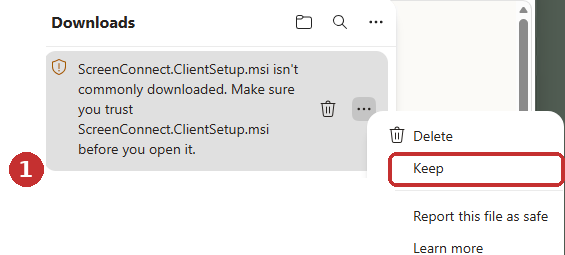
If you see a short message
Click the three dots next to the file name, then Keep.
If you see a larger box
Check the Publisher line first, then click the arrow next to Delete and choose Keep anyway.
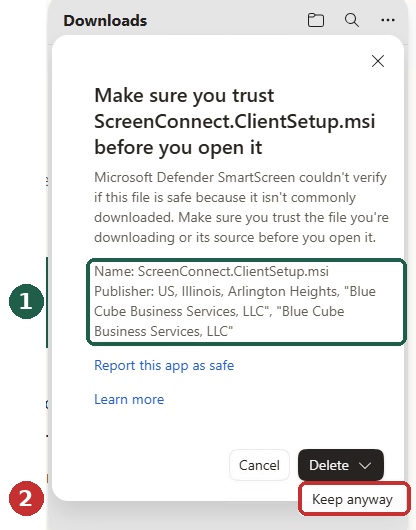
The Publisher line should read:
Blue Cube Business Services, LLC — Arlington Heights, IllinoisThat's our registered business name. If it says anything else, or says Unknown publisher, stop and contact us before going any further.
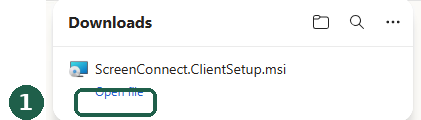
You'll know it worked when
The warning is replaced by a plain Open file link.
If you see “Windows protected your PC”
Opening the file may bring up one more blue Windows box. At first it only offers Don’t run — click More info.
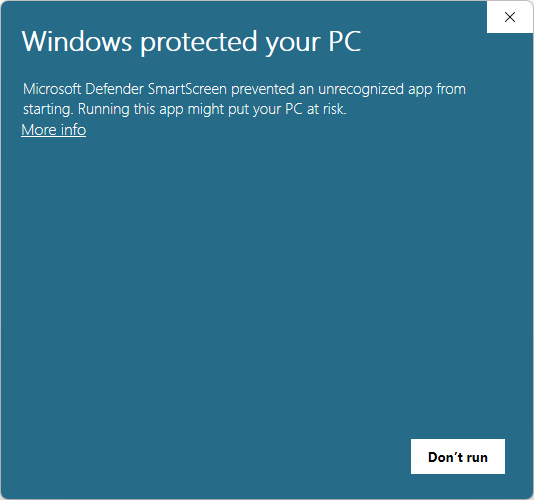
The box expands to show the file name and Publisher. Check that the Publisher includes Blue Cube Business Services, LLC, then click Run anyway.
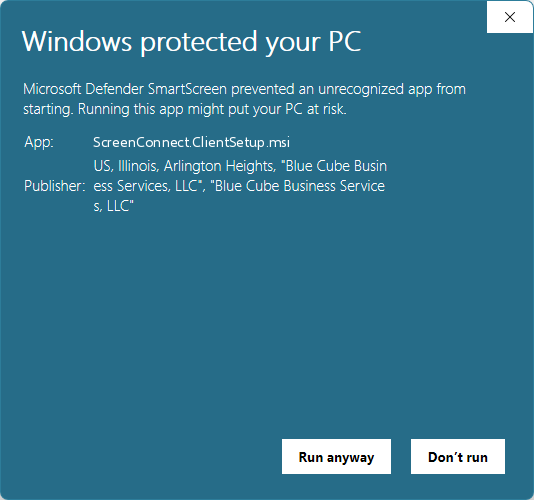
Chrome and Firefox show similar warnings with different wording. The same rule applies — check the publisher name, then continue.
Still stuck? Contact us and we'll walk you through it.
Alternate remote support
Only use this if we've asked you to. It's a backup for when the main download above won't install or connect.
Download alternate tool Windows · FCS-Remote-Support.exe- Open the file once it finishes downloading. Windows will likely show a warning first — see below.
- Let it unpack. A remote support window will open after a few seconds.
- Read us the ID number shown in that window, and we'll connect from there.
If you see “Windows protected your PC”
At first the box only offers Don’t run — click More info.
The box expands to show the file name and Publisher. Check the Publisher, then click Run anyway.
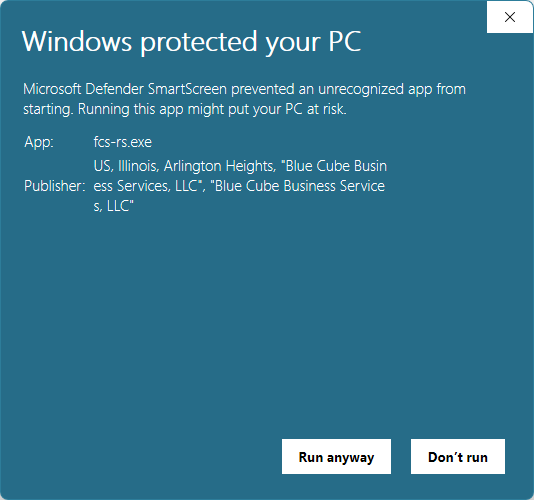
The Publisher line should read:
Blue Cube Business Services, LLC — Arlington Heights, IllinoisIf it says anything else, stop and contact us before going any further.
We only ask you to install this after being instructed to do so by us.
If someone contacted you out of the blue and sent you here, hang up and contact us ASAP.